
Mercury controllers using mTLS remain offline after moving them
2026-04-28Last updated
If your Mercury controller, using mTLS (mutual TLS) authentication, does not come back online after being moved to another access control appliance, you need to reset the connection type on the Mercury controller’s web page.
Cause
The Mercury controller can fail to reconnect when mTLS authentication is enabled if one of the following occurs during a move:
- The access control appliance goes offline or becomes unavailable.
- The Mercury controller goes offline.
Solution
Manually reset the connection type to TLS Required on the Mercury controller's web page to add the controller to a different appliance.
- Log on to the Mercury controller through its Configuration Manager web page.
- From the left-side menu, select Host Comm.
- From the Data Security list, change Mutual
TLS to TLS Required.Example:
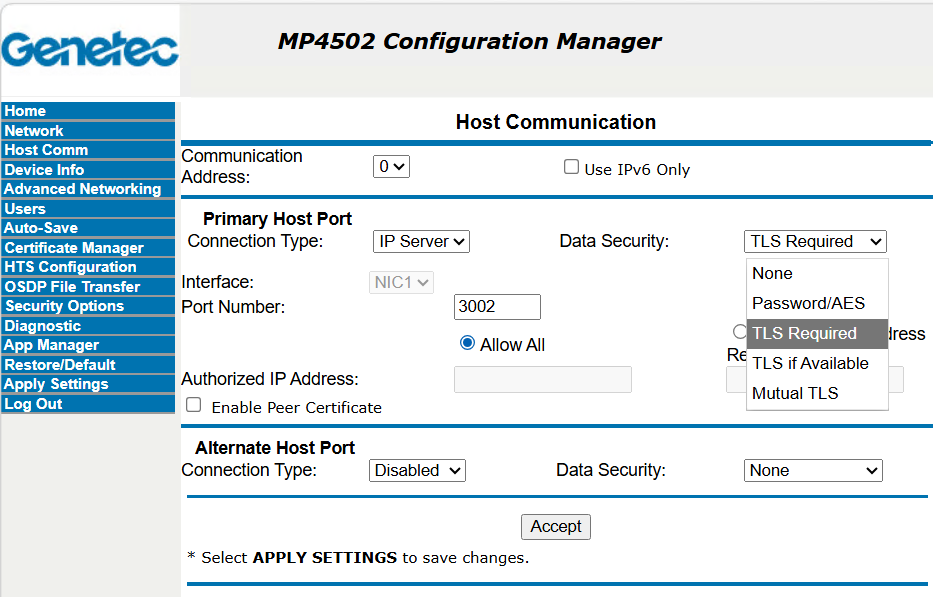
- Click Accept.
- From the left-side menu, click Apply Settings, and then click Apply Settings, Reboot.
If the Mercury controller does not come online after a few minutes, reset the connection from the Synergis™ Appliance Portal.